[//]: #@corifeus-header
[](https://www.npmjs.com/package/p3x-onenote) [](https://paypal.me/patrikx3) [](https://www.patrikx3.com/en/front/contact) [](https://www.facebook.com/corifeus.software) [](https://network.corifeus.com/status/31ad7a5c194347c33e5445dbaf8)
# 📚 P3X OneNote Linux v2026.4.104
🌌 **Bugs are evident™ - MATRIX️**
🚧 **This project is under active development!**
📢 **We welcome your feedback and contributions.**
### NodeJS LTS is supported
### 🛠️ Built on NodeJs version
```txt
v24.14.0
```
# 📝 Description
[//]: #@corifeus-header:end
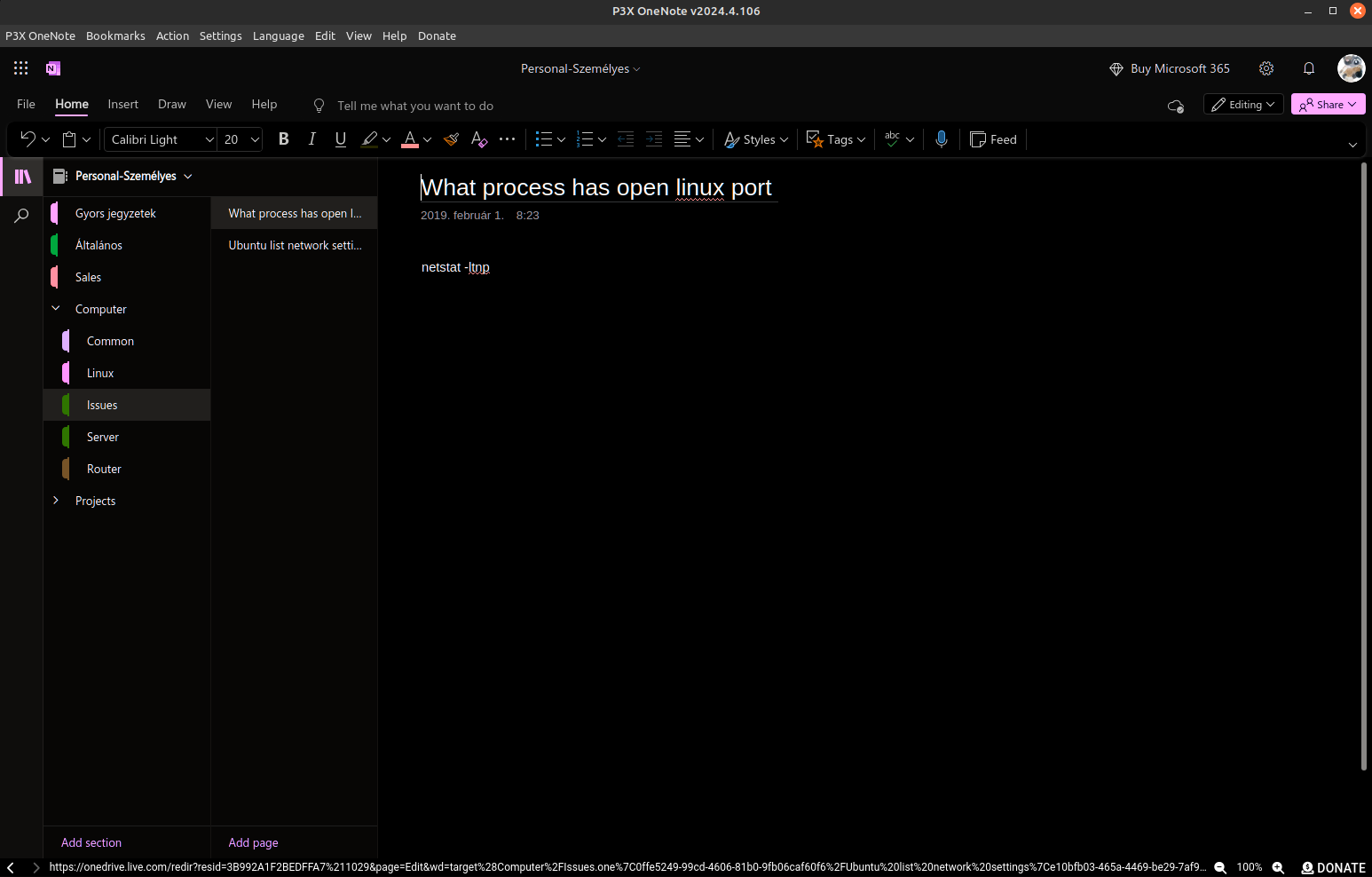
A Linux compatible version of OneNote.
---
# Features
P3X OneNote Linux is an independent browser window for the online OneNote, so you can use it without cluttering your browser.
**Core highlights:**
* Runs in its own process, independent from any browser
* System tray support — close the window and keep it running in the background
* Cached data for faster startup compared to opening a new browser tab each time
* Supports both corporate and personal Microsoft accounts
* Auto-updates when a new version is available
* Access other Microsoft online applications as well (dedicated purpose is OneNote)
## Detailed Features
**User interface:**
* Press `ALT` to access the menu
* Desktop menu system integration
* Window zoom functionality
* Dark mode (non-official workaround — may have minor inconsistencies since it is not directly supported by Microsoft)
* Launch minimized with the `--minimized` argument
**Navigation and clipboard:**
* Bottom bar displays the current URL — click it to copy to clipboard
* Edit menu includes "Copy this location to the clipboard" option
* Remembers the last opened notebook (to the extent permitted by Online OneNote)
**Settings (Menu > Settings):**
* **Close to the tray** — when checked, minimizes to tray instead of exiting; when unchecked, closes completely on quit
* **Proxy settings** — configurable through the settings menu
**Other:**
* Restart button to clear cache (useful for resolving errors and re-logging in)
* `Corporate home` menu item — note: without a corporate login, debugging this feature is not possible. If issues arise, providing login details may help with troubleshooting.
* **Language:** The language selector in P3X OneNote only controls the Electron app UI (menus, dialogs, buttons). To change the OneNote web content language, you must update your language in your [Microsoft account profile](https://account.microsoft.com/languages). Translations are community-driven:
* [Translation resources on GitHub](https://github.com/patrikx3/onenote/tree/master/src/translation)
* Available languages:
Afrikaans, العربية (Arabic), বাংলা (Bengali), Català (Catalan), Čeština (Czech), Dansk (Danish), Deutsch (German), Ελληνικά (Greek), English, Español (Spanish), Suomi (Finnish), Français (French), עברית (Hebrew), Magyar (Hungarian), Italiano (Italian), 日本語 (Japanese), 한국어 (Korean), Norsk (Norwegian), Nederlands (Dutch), Polski (Polish), Português (Portuguese), Română (Romanian), Русский (Russian), Српски (Serbian), Svenska (Swedish), Türkçe (Turkish), Українська (Ukrainian), Tiếng Việt (Vietnamese), 简体中文 (Simplified Chinese), 繁體中文 (Traditional Chinese)
* Multiple instances are supported with limitations:
* Configure using a single instance first, exit, then launch multiple instances to avoid synchronization issues
* Running multiple instances is possible but not recommended
<!-- (`````~/.local/share/applications/p3x-onenote.desktop`````) -->
---
# Installation
All releases are available on the [GitHub Releases](https://github.com/patrikx3/onenote/releases) page.
## Snap
[](https://snapcraft.io/p3x-onenote#cory-non-external)
## Flatpak
Download from the releases page and install:
```sh
wget https://github.com/patrikx3/onenote/releases/download/v${VERSION}/P3X-OneNote-${VERSION}-x86_64.flatpak
flatpak install ./P3X-OneNote-${VERSION}-x86_64.flatpak
flatpak run com.patrikx3.onenote
```
The menu entry is integrated automatically.
## AppImage, deb, rpm
AppImage, deb, and rpm packages auto-update themselves.
<!--
#### To integrate into the menu in AppImage
Execute:
```bash
sudo add-apt-repository ppa:appimagelauncher-team/stable
sudo apt-get update
sudo apt-get install appimagelauncher
```
-->
**Setting up AppImage:**
```bash
mkdir -p $HOME/opt
mv ~/Downloads/p3x-onenote-a.b.c-x86_64.AppImage $HOME/opt/
chmod +x $HOME/opt/p3x-onenote-a.b.c-x86_64.AppImage
# Then you can run it
$HOME/opt/p3x-onenote-a.b.c-x86_64.AppImage &
```
<!--
It then actually integrates itself into the menus and it will auto update itself.
(The GitHub versions are always instant, while the ElectronJs Apps releases are delayed.)
-->
The app can also be found on [ElectronJs Apps](https://electronjs.org/apps) — search for `P3X`.
## Windows
Windows builds are available. See [Issue #168](https://github.com/patrikx3/onenote/issues/169) for background.
## macOS
Builds are available for both Intel and Apple Silicon architectures.
**Removing quarantine on downloaded files:**
If you download the `zip` file for the `arm64` version, run the following command on the unzipped app to remove the macOS quarantine attribute:
```bash
sudo xattr -rd com.apple.quarantine P3X-OneNote.app
```
This allows the application to run without security interruptions from macOS.
<!--
If you want to install it on NodeJs instead of the AppImage, it is deprecated, but available [here](https://github.com/patrikx3/onenote/blob/c78e77c540e21b89e0e063cd50a10707faae722e/README.md#cli-install)
## Important Note
Check the ```Keep me signed in``` checkbox when entering your password then choose any page (but not a notebook) after logging in. This will keep you logged in.
**Do not install this app using the Command Line Interface (CLI) as it is deprecated**
The ```CLI``` installation does not always work due the updating of Linux distros. Is is possible the ```configstore``` only works with ```sudo```, so use the ```released``` ```AppImage``` instead!
Installation of ```NodeJs``` is not necessary since the ```AppImage``` includes all dependencies.
```bash
# If this weird NPM error is encountered, do the following:
node -v
# make sure the node version is above 8.9.0
sudo npm install -g p3x-onenote --unsafe-perm=true --allow-root
p3x-onenote
```
Logout and relogin, and a menu will now appear.
-->
## NPM (for Node.js users)
[Install via NPM](artifacts/npm.md)
---
# Change Log
[Read the change log](change-log.md)
<!--
# Issues
#### Corporate login
The corporate login is unstable, either it works or not. Only the personal account that I can provide some minimal support.
#### Suspend/Sleep/Wake up
I recognized, that after suspend/sleep and then wake up, the app is not saving the pages anymore. For now, the solution is, that after wake up, restart the app.
#### Not working on SNAP on some versions
Usually, on stable distros are working with SNAP, but usually non stable Linux distros could not work. Please, try using the `AppImage`, that is usually better than SNAP.
#### Error in auto-updater: Redirect was cancelled
Sometimes, you get an `AppImage` error for update, just download the latest release and replace the `AppImage` from here:
https://github.com/patrikx3/onenote/releases
#### Rasberry and ARM is experimental
I have no ARM computer to test it out, I could build `AppImage` on ARM, but I have no idea if has an error, it crashes or it works.
#### Tray issues
It is possible, that the tray is not working, it is an upstream issue!
#### Not loading the pages / freezes
Sometimes, it is possible, that OneNote Online does not load properly or freezes, the solutions is to quit and start the program again. (I know, you won't like it at all! 😡)
## Unable to log in
This only happens if you kill ```P3X OneNote Linux``` and then relogin many times. So, If the program needs to be killed often, ```sign out``` (on the top right of the Electron browser frame) just to be safe.
### BUT!
**Exiting using ```quit``` from the ```p3x-onenote``` menu or the tray, will prevent the problem.**
#### Online OneNote Change language
Although the main page's language can be changed, it reverts back when an actual page is accessed.
This is being investigated.
https://github.com/patrikx3/onenote/issues/14
#### Electron problem
🐞 Since Electron v3, the tray left click is executing as the right click, Electron bug.
https://github.com/patrikx3/onenote/issues/38
#### Fedora
https://github.com/patrikx3/onenote/issues/3#issuecomment-312711801
-->
---
# Development
* Use **kebab-case** for all file and folder names (not camelCase)
* Apply the `.editorconfig` settings in your IDE
* To generate `rpm` on Ubuntu: `sudo apt-get install rpm`
* To build with NPM, move `electron` from `devDependencies` to `dependencies` (the default setup is designed for AppImage distribution, not NPM)
---
# Links
* [P3X OneNote Linux Playground](https://www.patrikx3.com/en/front/playground/13/p3x-linux-onenote#PG13)
* [Corifeus P3X OneNote Linux](https://corifeus.com/onenote/)
* [AlternativeTo](https://alternativeto.net/software/p3x-onenote/)
* [NPM Package](https://www.npmjs.com/package/p3x-onenote)
* [Snap Store](https://snapcraft.io/p3x-onenote)
* [GitHub.IO Page](https://patrikx3.github.io/onenote/)
* [Web Development (EN)](https://corifeus.eu/)
* [Webfejlesztés (HU)](https://corifeus.hu/)
[//]: #@corifeus-footer
---
## 🚀 Quick and Affordable Web Development Services
If you want to quickly and affordably develop your next digital project, visit [corifeus.eu](https://corifeus.eu) for expert solutions tailored to your needs.
---
## 🌐 Powerful Online Networking Tool
Discover the powerful and free online networking tool at [network.corifeus.com](https://network.corifeus.com).
**🆓 Free**
Designed for professionals and enthusiasts, this tool provides essential features for network analysis, troubleshooting, and management.
Additionally, it offers tools for:
- 📡 Monitoring TCP, HTTP, and Ping to ensure optimal network performance and reliability.
- 📊 Status page management to track uptime, performance, and incidents in real time with customizable dashboards.
All these features are completely free to use.
---
## ❤️ Support Our Open-Source Project
If you appreciate our work, consider ⭐ starring this repository or 💰 making a donation to support server maintenance and ongoing development. Your support means the world to us—thank you!
---
### 🌍 About My Domains
All my domains, including [patrikx3.com](https://patrikx3.com), [corifeus.eu](https://corifeus.eu), and [corifeus.com](https://corifeus.com), are developed in my spare time. While you may encounter minor errors, the sites are generally stable and fully functional.
---
### 📈 Versioning Policy
**Version Structure:** We follow a **Major.Minor.Patch** versioning scheme:
- **Major:** 📅 Corresponds to the current year.
- **Minor:** 🌓 Set as 4 for releases from January to June, and 10 for July to December.
- **Patch:** 🔧 Incremental, updated with each build.
**🚨 Important Changes:** Any breaking changes are prominently noted in the readme to keep you informed.
---
[**P3X-ONENOTE**](https://corifeus.com/onenote) Build v2026.4.104
[](https://www.npmjs.com/package/p3x-onenote) [](https://www.paypal.com/cgi-bin/webscr?cmd=_s-xclick&hosted_button_id=QZVM4V6HVZJW6) [](https://www.patrikx3.com/en/front/contact) [](https://www.facebook.com/corifeus.software)
[//]: #@corifeus-footer:end